Part 3: Methods to Find The Projection Matrix
I will be going over methods that I use to find the projection matrix. Keep in mind these are just the methods I personally use, easier methods probably exist.
Our work flow will go like so:
Find Projection Matrix -> Trace Construction -> Reverse Construction
10 times harder than it seems…
Methods to find Projection Matrix
1. The 1,-1 / Up-Down Trick:
First we look max up in game and search for the value “1” in cheat engine, then look down and search for the value “-1”. Repeat this process until you narrow down the results.
When you finish narrowing it down you will get the View or Camera Matrix. Now the trick here is that all these matrices are probably in some kind of camera structure and they store
multiple matrices close in memory and there is a high chance one of those matrices is a projection matrix.
If you do not find a Projection Matrix but instead a View-Projection Matrix and a View Matrix then you can simply derive the Projection Matrix using Matrix Algebra:
If the game uses the row-vector convention (common in DirectX), where the multiplication order is:
\(VP = V \times P\)
You can solve for P by left-multiplying both sides by the inverse of the View matrix ($V^{-1}$):
\(P = V^{-1} \times VP\)
If the game uses the column-vector convention (common in OpenGL), where the multiplication order is:
\(VP = P \times V\)
Then, you can solve for P by right-multiplying both sides by the inverse of the View matrix ($V^{-1}$):
\(P = VP \times V^{-1}\)Then simply search for the Projection Values!
2. Focal Length Scanning:
For this method to work the game must expose its FOV. This will usually be exposed in settings using degrees (Usually FovX is exposed). For this to work you need to understand that the
first term (xScale) of the projection matrix is 1/tan(fovX/2) so in Cheat engine we are searching for the result of 1/tan(fovX/2). First step is converting the degrees seen on the FOV
slider to radians and simply compute the result of 1/tan(fovX/2). Way easier to narrow down results than method 1.
3. Brute Force:
This is the most time-consuming method. If the game does not give any hints about its FOV (Fov Slider is not available or Values in the slider are not real degrees etc) then we can use this method without being a full-blown reverse engineer:
- If Fov slider is not exposed:
Before we get into the method let me teach some theory. This is the relation between xScale and yScale: \(\tan\left(\frac{\mathrm{FOV}_x}{2}\right) = AR \cdot \tan\left(\frac{\mathrm{FOV}_y}{2}\right)\)
Now we can’t change FOV but we can change Aspect Ratio! (Hopefully)
The trick is in the “Increased Value” and “Decreased Value” scan methods of Cheat engine. If you increase the Aspect Ratio (e.g., moving from 16:9 to 21:9) the engine must change the xScale value in the Projection Matrix to prevent the image from stretching. So: Increasing the aspect ratio causes xScale to decrease and vice-versa.
Engine might be Vert- scaling instead of Hor+ Scaling, just keep in mind
- If Fov slider has no real values:
Well its the same principle, “Increased Value” and “Decreased Value” scan methods of Cheat engine is your friend!
Increasing FOVx → xScale decreases and vice versa
4. Tracing Flow:
This is kinda difficult for most people to do, you need to have a keen eye for recognizing 4x4 Matrix Multiplies and Projection Matrix Construction code in IDA.
The key idea is that you did method 1 and couldn’t find the projection matrix anywhere close in memory, So you trace the flow of matrices. Got Camera or View Matrix? Great!
Use the “What instruction accesses this memory address” function in cheat engine and it will show you the exact function which uses said matrices. Then simply decompile the functions in IDA.
Now there are 3 different things I usually look for when decompiling these functions:
a) Large Matrix Construction Function
You would see a very large Matrix Construction function responsible for constructing many different matrices per frame eg Proj, Cam, View, InvProj, InvView, VP, VP^-1 etc… Now you need a keen eye to isolate just the Projection Construction, ask yourself is it using values relating to an aspect ratio? 1.7777, 1.3333? is it calling tanf/atanf functions? is it then doing 1/the tanf call? are zNear and zFar its parameters? etc…
Keep these derivations in mind as well :> (very helpful while trying to pin point it)
Let A denote the Aspect Ratio, defined as
\[A = \text{AspectRatio} = \frac{\text{Width}}{\text{Height}}\]The relationship between \(FOV_x\) and \(FOV_y\) is:
\[\tan\left(\frac{FOV_X}{2}\right) = A \cdot \tan\left(\frac{FOV_Y}{2}\right)\]From this, we can express each one in terms of the other:
\[FOV_X = 2 \cdot \tan^{-1}\!\left(A \cdot \tan\!\left(\frac{FOV_Y}{2}\right)\right)\] \[FOV_Y = 2 \cdot \tan^{-1}\!\left(\frac{\tan\!\left(\frac{FOV_X}{2}\right)}{A}\right)\]Example Image:
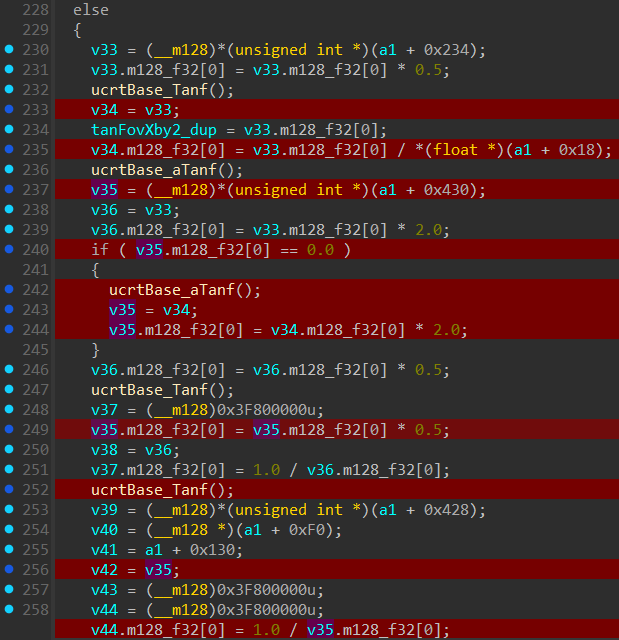
b) 4x4 Matrix Multiply:
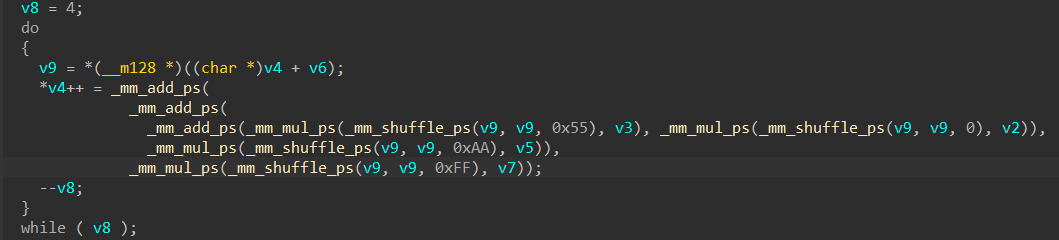
If you see Heavy SIMD usage specifically addps, shufps, mulps where shufps uses these constants to broadcast a single variable (0x00, 0x55, 0xAA, 0xFF) you can be pretty sure its doing a Matrix 4x4 Multiply, Now just look at the parameters and you would likely see its doing View * Projection (or Projection * View depending on row vs column major) and boom, it led us to the projection matrix!
Example Image:
c) Large Matrix copy function
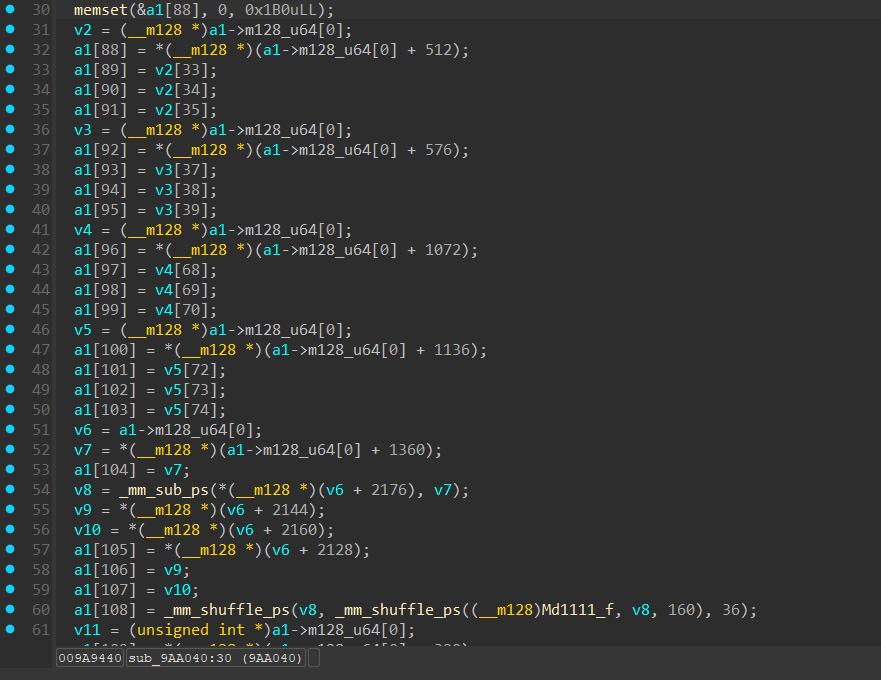
If you landed in a Large Matrix Copy Function, you probably tracked down the final GPU-bound floats. A routine that is just copying the finished matrices into a staging buffer to send to the GPU or something else.
You will have to trace further back, Look at the Stack, call locations, trace back etc…
Example Image:
5. Pattern Recognition (Jitter Tables):
To understand this concept you need to understand what Temporal Anti-Aliasing is:
The basic principle on why this method works is that TAA relies on different subpixel values for anti aliasing, different subpixel values are achieved by jittering the projection matrix
every frame. If we know the exact pattern in the Jitter Table we could scan that exact same pattern as a “Grouped Scan” in Cheat engine. Once you find the jitter table use the
“Find out what instruction access this memory address” and it will lead you to the code that jitters the projection matrix leading us to the projection matrix.
You will likely see them accessing the jitter table and scaling it down with current Resolution X and Y and then it multiplying the projection Matrix with an identity Matrix in which
the subpixel jitter values were placed inside it.
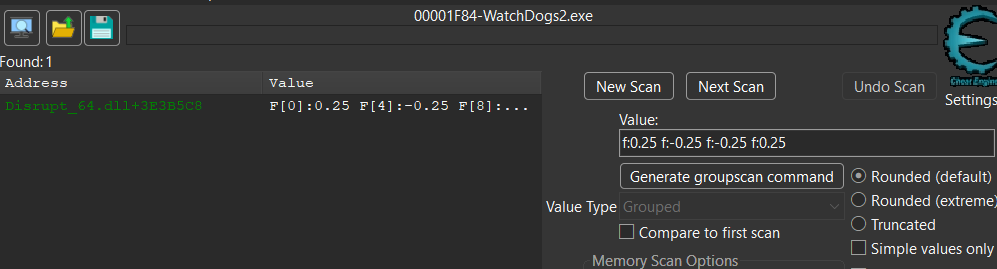
eg: In almost all SMAA_T2X games the pattern is {0.25, -0.25} and {-0.25, 0.25} (Watch Dogs2, Just cause 3, Dying Light all had this exact pattern for SMAA_T2X).
So in Cheat Engine select “Value Type” as “Grouped” and put “ f:0.25 f:-0.25 f:-0.25 f:0.25 “ in the Scan Box and you should get the Jitter array (Usually a static memory address)
same method used in Watch Dogs 2
6. The Graphics Debugger Route (RenderDoc to Memory):
I will be honest, this is a method I haven’t personally had to rely on yet, but the theory is rock solid!
Instead of hunting blindly in memory, you start at the GPU level using a graphics debugger like RenderDoc. The workflow looks something like this:
-
a) Capture a frame of the game in RenderDoc.
-
b) Look through the Event Browser and select a substantial geometry draw call, usually something like DrawIndexed() with a high index count.
-
c) Inspect the Constant Buffers (CBuffer) bound to the Vertex Shader for that draw call.
-
d) The vertex shader mathematically requires the View and Projection matrices to transform local geometry into clip space. By looking through the bound buffers, you can physically see the 4x4 matrix floats sitting right there in the GPU state.
-
e) Once you spot the Projection Matrix, note it down.
Armed with those exact highly specific floats, you switch back to Cheat Engine and do a “Grouped” scan. Because you are searching for 4 or 5 exact float values in a specific order, you will usually find the CPU-side memory address instantly.
Once you have that address you can do the “Find out what instruction accesses this memory address” in Cheat Engine. From there, you take the instruction pointer straight into IDA Pro.
You will probably reach the Projection Construction function.
Sometimes the constant buffers wont even have the Projection Matrix lol. Would Probably be Multiplied with other matrices.
Next we will be using these methods to find the projection matrix in far cry new dawn.